Thursday, January 28, 2010

HP Data Protector : There is no more space in the internal database for filenames


There is no more space in the internal database for filenames
This error occured due to filename.dat (The max size 2gb) so we are getting above error.
due to this while taking backup or intiated it is giving a critical error like backup is taken with logging.
Ther Resuloutaion.
In Catalog database we added another table name for more space.
now there is no error


Internal Database network communication error


The above screen describes the cell manger unable to connect the velocis database .
inthis case the user may not have the enough privilages .
hope while troubleshooting this may usefull.

Wednesday, January 20, 2010

Bocada plugin

Some good reference

(pls refere for more inforamtion on DP errors and reporting BOCADA site)

All this information you can find in BOCADA plugin for HP DP Guide.

pls gothrough it copied some of the error messages here for reference.

❒[84:600] Cannot establish connection with Library Manager host. VBFS API error code ([num]).
❒[84:2399] param1 Disk quota information was restored as plain text file: param2
❒[90:11] Unrecognized option “p” => ignored
❒[90:12] param1 Cannot open option file: (param2)
❒[90:17] Cannot param1 NETIO process (param2) => aborting
❒[90:41] Invalid device type specified (param1) => abort­ing
❒[90:43] param1 Invalid physical device type => aborting
❒[90:44] No physical device(s) specified => abort­ing
❒[90:45] No exchanger con­trol device specified => aborting
❒[90:71] param1 Cannot open() script: (param2)
❒[90:73] param1 Error read­ing script output (param2)
❒[90:120] param1 Cannot get device file status (param2) => aborting
❒[90:121] param1 Not a char­acter device nor regular file => aborting
❒[90:123] param1 Unknown device, please check device support matrix
❒[90:124] Not a BSD device => aborting
❒[90:125] Limited block size of 64K => aborting
❒[90:126] Not a variable block size => aborting
❒[90:157] param1 Rewindable device.
❒[81:53] [param1] Not in hard link catalog => backed up regularly.
❒[81:54] [param1] Object does not reside in current filesystem => not backed up.
❒[81:76] [param1] Can not perform stat(): [param2] => not backed up.
❒[81:141] [param1] Can not export configuration object: [param2] => backup incom­plete.
❒[81:180] [param1] Can not clear archive flag: [param2].
❒[81:181] [param1] Dupli­cate filename => not backed up.
❒[81:202] [param1] Not a valid VBFS mount point => aborting.
❒[81:302] [param1] Object is not a character device => not backed up.
❒[81:304] [param1] Object is a mounted filesystem.
❒[81:305] [param1] Can not compute disk capacity [param2] => not backed up.
❒[84:5] Filesystem too deep: (param1) levels .
❒[84:6] Cannot open mount table: (param1).
❒[84:109] Incorrect type of backup must be done with: p.
❒[84:114] Unknown type of compression: [num].
❒[84:119] Unknown type of encoding !
❒[84:208] param1 Configura­tion object not recognized by the system => not restored.
❒[84:210] param1 Object is not restorable.
❒[84:500] Cannot migrate file (p) to the nearline storage. VBFS API error code ([num]).

Monday, January 18, 2010

[12:1051] Client security violation. Access denied. in DP 6.1


Critical] [110:1043] Hostname reported by client ([Critical] From: INET@hifalwps2 "hiaflwps2" Time: 01/18/10 09:45:00
[12:1051] Client security violation. Access denied.

When i got this error i found 2 problems.

1. cell manager system host entry (ie c:\windows\system32\driver\etc\hosts) and one more client side host entries problem. even if u are update boath side pls check with installation server same.

2. After this also if u are facing same problem pls add cell manger host name in

client side . ex: if os is hp-ux pls add cell manager host entry in etc\opt\omni\client\allow_host

Tuesday, December 8, 2009

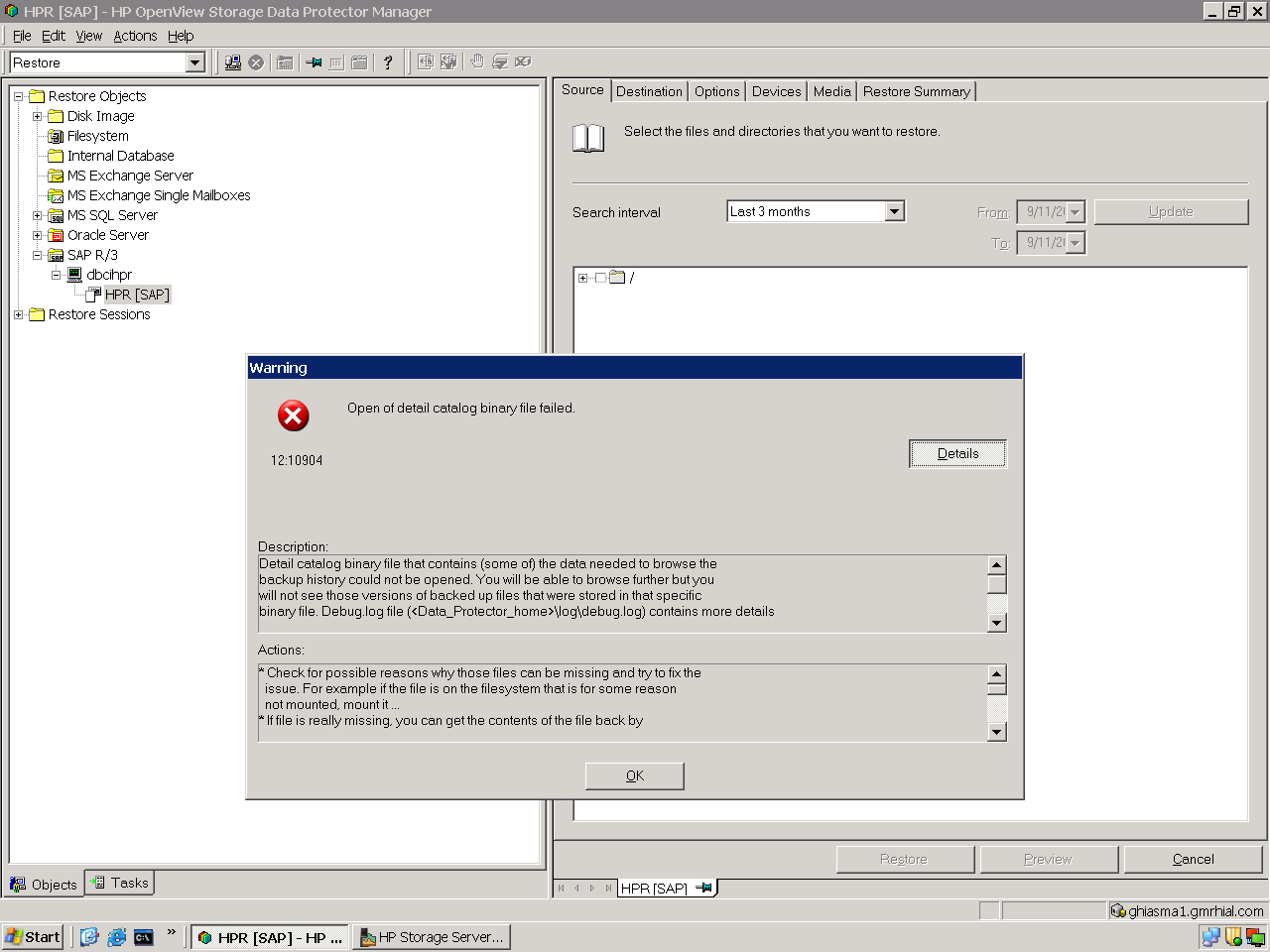
DCBF is moved getting errors ????????


Data Protector could not store a part of the detail catalog during the backup or import. All files that are backed up on the same device after this message are not marked as backed up in the Data Protector Internal Database. Backup is still valid and restore of complete objects is possible.
------------

* Check the additional error message for the cause of the problem and fix the problem. Most often the problem will occur when the disk runs out of space or when the maximum size limit of the DC directories is reached. * If you want to browse files in that particular backup import the catalog for the medium that was in use when the error occurred and all media that were written after the error in the same device
----------------------------

Check for possible reasons why those files can be missing and try to fix the issue. For example if the file is on the filesystem that is for some reason not mounted, mount it ... * If file is really missing, you can get the contents of the file back by executing the following procedure: 1) Stop all sessions and close all GUIs 2) Run: omnidbutil -fixmpos 3) Find the correct medium and run "Import catalog" for that medium. Note that the debug.log contains the medium ID of the file and that you can use: omnimm -media_info * You may want to further check the Internal Database and then recover it if required. See the chapter "Managing the Data Protector Internal Database" in Data Protector Admin Guide

The above messages contains the problem and it solution. we found when some of dcbf files moved related bakup is firing at that time it is fired. if dcbf directory getting more space simply map additional directory to IDB but don't move to some other place

Friday, November 27, 2009

Some of errors in IDB


The above screens shows IDB databases(MMD, DCBF) errors. when thease errors occured the best tool fix this is omnidbcheck -fixmpos, Pls go through my previous post on this for more details.


Finding Medium


The Above screen shows medium importing ,
Yesterday i faced a issue with LTO3 Tapes when the tapes changed by some other egneer mistakenly he changed the tape in different slots. so we run the scan command in DP the entire tapes lost their pool names, after that import/scan command we indified each tape belongs to which pool the above screen shows the same.

Thursday, November 12, 2009

Some more screens from OPEN FILER NAS


Most important thing is openfiler webinterface administrator login
for that user name is : openfiler
password is : password

any body can easily configure who is having minimum knowledge of NAS concept.

Monday, November 9, 2009

Openfiler NAS

http://www.openfiler.com/

Any body want know how a NAS works and Who wants learn Clustering they can use openfiler in vmware and you can emulate cluster environment . This is Freeware so everybody can download start playing with your OWN NAS storage.

Mainly for students who want to learn Clusters , Nas Storage it good tool you can practice with this. It is support ISCSI protocal so qurom disk can create in cluster.
For more info
http://www.openfiler.com/products/screenshots

Tuesday, November 3, 2009

Data Protector License details

Licensing mode : LocalLicense server dp@dp.com

Category Number of Licenses

Cell Manager for all platforms 0

Cell Manager for Windows / Linux 1

Tape drive for SAN / all platforms 2

Direct attached tape drive for Windows / NetWare / Linux 2

Multi-Drive Server for UNIX 0

Multi-Drive Server for Windows / NetWare 0

On-line Extension for UNIX 0

On-line Extension for Windows 0

Manager-of-Managers Extension for all platforms 0

Manager-of-Managers Extension for Windows / Linux 0

61-250 Slot Libraries Extension for UNIX 0

61-250 Slot Libraries Extension for Windows 0

Unlimited Slot Libraries Extension for UNIX 0

Unlimited Slot Libraries Extension for Windows 0

EMC Split Mirror Extension 0

HP XP Split Mirror Extension 0

Single Server Edition for all platforms 0

Single Server Edition for Windows / Linux 0

On-line Extension for ONE UNIX system 5

On-line Extension for ONE Windows / Linux system 10

Extension for ONE 61-250 Slot Library 1

Extension for ONE 61-250 Slot Library for Windows 0

Extension for ONE Unlimited Slot Library 0

Extension for ONE Unlimited Slot Library for Windows 0

Zero Downtime Backup Extension for ONE EMC Symmetrix 0

Zero Downtime Backup Extension for ONE HP StorageWorks XP 0

Extension for ONE NDMP Server 0

Zero Downtime Backup for 1 TB EMC Symmetrix / DMX 0

Zero Downtime Backup for 1 TB HP StorageWorks XP 0

Zero Downtime Backup for 1 TB HP StorageWorks EVA/VA 0

Instant Recovery for 1 TB HP StorageWorks XP 0

Instant Recovery for 1 TB HP StorageWorks EVA/VA 0

Direct Backup for 1 TB HP StorageWorks XP or compatible 0

Direct Backup using NDMP for 1 TB 0

Direct Backup for 1 TB HP StorageWorks VA 0

Zero Downtime Backup for 1 TB HP StorageWorks Modular SAN Array 1000 0

Instant Recovery for 1 TB HP StorageWorks Modular SAN Array 1000 0

Advanced backup to disk for 1 TB 0

We can Get license details through OMNICC command . above data shows the license details for data protector.

Total Pageviews